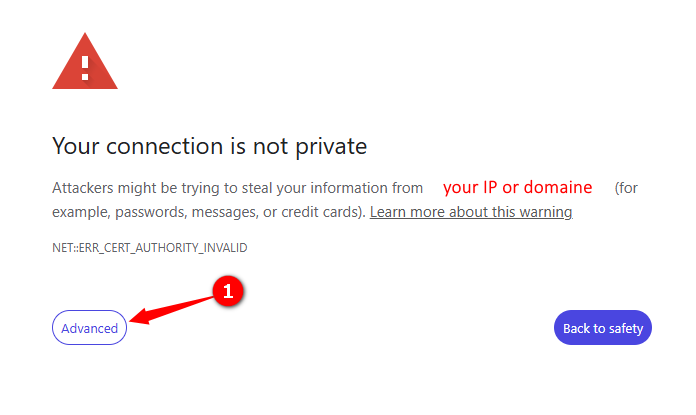
In Niagara N4, the "Your connection is not private" will apear and it's not a bug or an error
Since the HTML GUI use a self-signed certificate, thie error occurs because the browser cannot verify the certificate's authenticity, as self-signed certificates are not issued by a trusted certificate authority and must be manually trusted by the client or loaded into the device's trusted root certificate store. This is a security feature to protect against man-in-the-middle attacks.
Why the Error Appears
Self-Signed Certificate:
Niagara N4 systems often use self-signed certificates for internal or initial deployments, meaning the certificate's authenticity is not verified by a public certificate authority.
Browser Trust:
Your web browser, by default, does not trust self-signed certificates, leading to the "Your connection is not private" warning.
Data Security:
The warning is a safeguard to ensure that the data you send to the server is not intercepted or tampered with by a malicious third party.
STEPS TO LOGIN
- Click on the advance button
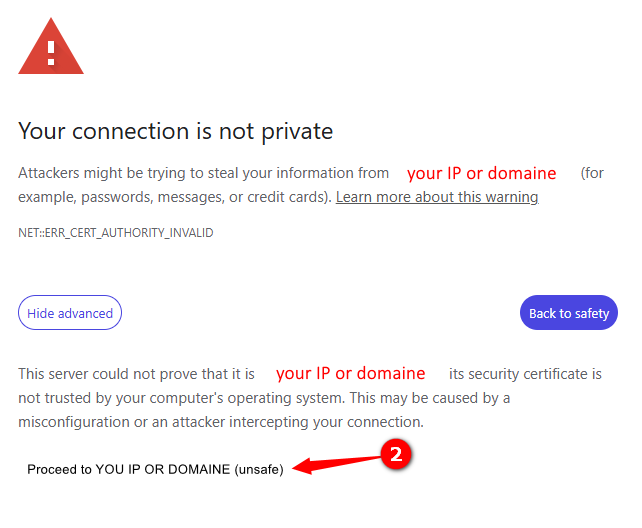
- Clik on the link Proceed to YOU IP OR DOMAINE (unsafe)
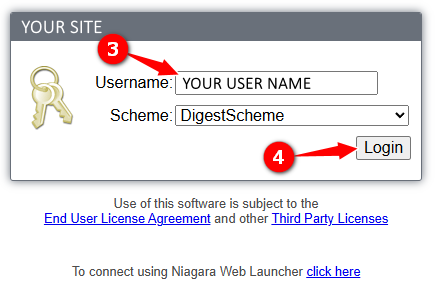
- Enter your user name
- Click the Login button
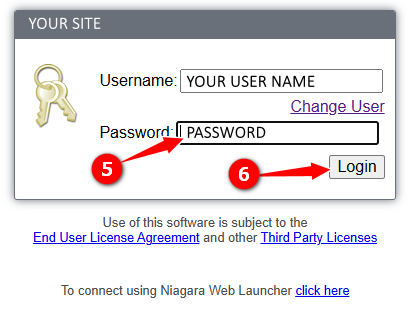
- Enter password
- Click Login button